Commands and Utilities
Browse the game commands and guides for configuring and managing the loot features of the official UniverseOT client.
In-game command list
Enter !commands to see every available command and its description.
Bank commands
| Command | Description |
|---|---|
!balance | Shows how much money you have in the bank. |
!transfer name, 1 | Transfers the specified amount to the selected player. In this example, replace name with the player's name; the transferred amount is 1. |
!withdraw, amount | Withdraws the specified amount from the bank. |
!depositall | Deposits all the gold you are carrying into the bank. |
House commands
| Command | Description |
|---|---|
!buyhouse | Buys a house. |
!sellhouse | Sells your house to another player. |
!leavehouse | Leaves the house. |
aleta som | Adds a player to the house list with permission to pick up items. |
aleta sio | Allows a player to enter the house without permission to move items. |
General commands
| Command | Description |
|---|---|
!chain on / !chain off | Enables or disables the Chain system. |
!time | Shows the server time. |
!food | Buys food. |
!autoloot on / !autoloot off | Enables or disables Auto Loot. A Loot Pouch is not required. |
!removemage | Removes the mage addon. |
!online | Shows the players who are online. |
!serverinfo | Shows the server stages. |
!randomoutfit on / !randomoutfit off | Enables or disables automatic outfit color changes. |
!bless | Buys blessings. |
!bp | Buys a backpack. |
!bonus | Shows your addon and mount bonuses. |
!checkvip / !vip | Checks how many VIP days remain. |
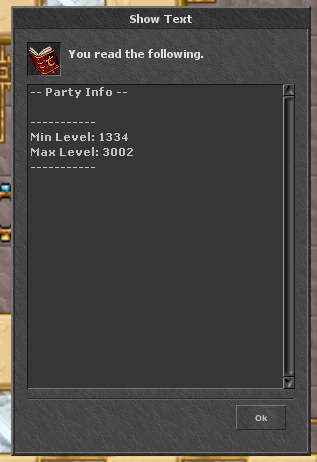
!shared | Shows the level range with which you can share experience. See the detailed guide on this page. |
!checkskull / /checkskull | Checks how much skull time remains. |
!addon | Adds an addon. A Gold Token is required. |
!mount | Adds a mount. A Silver Token is required. |
!fps | Disconnects the character. |
!promotion | Adds the character's promotion for 20k. |
Utility guides
Use the official client and keep it updated before configuring the features below.
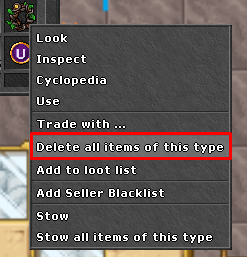
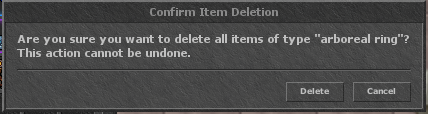
How to clean the Loot Pouch?
- Locate the Loot Pouch on your character.
- Hold Ctrl and click on it with the right button.
- Select delete all items of this type and confirm the operation.
- Wait for the message from the client before using the option again.
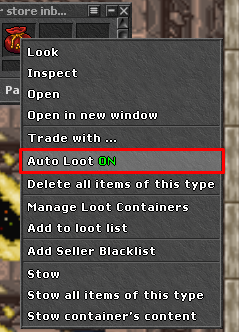
How to activate Loot Pouch?
- Keep the Loot Pouch available on the character.
- Use Ctrl + right click about her.
- Choose the option to Auto Loot ON/OFF.
- Check in the client whether the feature appears as active.
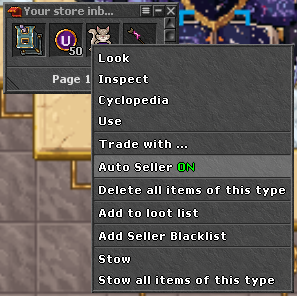
How to activate Loot Seller?
- Holding CTRL click on Loot Seller.
- Locate the Loot Seller ON/OFF option.
How do I add an item to the Blacklist?
- Locate the item you want to add to Blacklist.
- hold CTRL right click
- Select the add seller blacklist option.
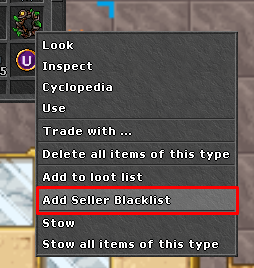
Use the blacklist to prevent items that are important to you from being automatically sold.
How to consult Shared Experience?
Enter !shared in chat to check the level range with which your character can share experience. The command shows which levels can share experience with you and helps you organize the party with your friends.
Tip:
Test settings with low-value items before starting a hunt.