RMT Market
Buy and sell items, KKs and Coins safely through the official server system.
RMT Market
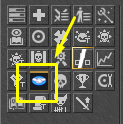
Overview
RMT Market is the official server system for buying and selling items, KKs and Coins using real money in a secure and automated way.
With it, players can advertise their assets, make purchases and receive payments without the need for external negotiations, ensuring more practicality, security and transparency for both parties.
How to use
To use RMT Market, you must have an account on Mercado Pago and link it to your character within the game.
- Create an account on Mercado Pago, if you don't already have one.
- Access RMT Market and enter the tab My Ads.
- Click the button Connect MP.
- Log in to your Mercado Pago account and authorize the integration.
- After confirming the link, you will be able to advertise items, KKs and Coins, in addition to making purchases normally.
Important
The Mercado Pago account must be verified and able to receive payments.
Buying
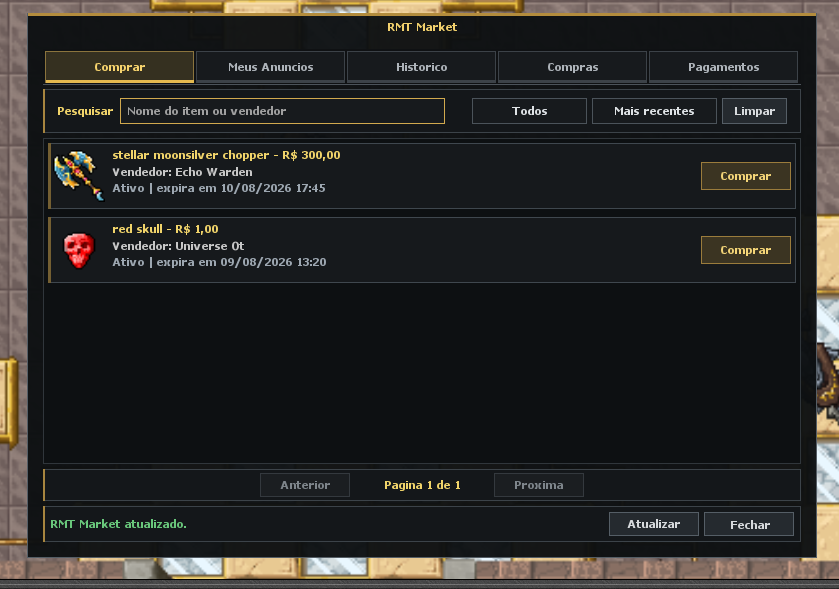
In the tab Buy, you will find all active ads posted by other players.
Each ad displays:
- Item name, KKs or Coins advertised;
- Price in Reais (R$);
- Seller's name;
- Ad expiration date.
To make a purchase:
- Select the desired ad.
- Click Buy.
- Confirm the operation.
- Make payment using Mercado Pago.
- After payment confirmation, the item, KKs or Coins will be automatically delivered to your character.
My Ads
The tab My Ads is the place where you manage all your sales in RMT Market.
It is possible:
- Connect or disconnect your Mercado Pago account;
- Create advertisements;
- Monitor the status of each ad;
- Cancel active ads.
Connecting your Mercado Pago account
Before creating any ad, it is mandatory to connect a Mercado Pago account.
- Access the tab My Ads.
- Click Connect MP.
- Log in to your Mercado Pago account.
- Authorize integration with the server.
- After confirmation, your account will be ready to receive payments.
The connection only needs to be made once. After that, your account will remain linked until you choose to disconnect it.
Creating an ad
The system allows you to advertise three types of products:
Advertise Item
Allows you to sell any item allowed by the server for real money.
- Select Advertise Item.
- Drag the desired item to the indicated space.
- Enter the sale value in Reais (R$).
- Click Advertise Item to publish the ad.
Advertise KKs
Allows you to sell Gold (KKs) for real money. Select Advertise KKs, enter the amount of KKs you want to sell and define the value in Reais (R$).
Advertise Coins
Allows you to sell Coins from the server for real money. Select Advertise Coins, enter the quantity of Coins you want to sell and set the price in Reais (R$).
Fees
All sales made through RMT Market have the following fees:
- 15% on the final sale value.
- 5 KKs charged at the time each ad is created.
The rates are informed in the interface itself before confirming the ad.
Ad status
Each ad may have one of the following statuses:
- Active: available for purchase.
- Sold: the sale was completed successfully.
- Canceled: The listing was canceled by the seller.
- Expired: the ad time ended without a sale being made.
Canceling an ad
If you wish to remove an ad from the marketplace, simply click the button Cancel next to the corresponding ad.
If the listing has not yet been sold, the item, KKs or Coins will be automatically returned.
Blocking due to payment abandonment
To prevent abuse, the system applies a temporary block when a player starts a purchase and does not complete the payment.
During this period, the player will be temporarily prevented from making new purchases and sales through RMT Market. The remaining blocking time is displayed at the top of the system window.
History
In the tab History, you will be able to consult all the movements carried out in RMT Market:
- Purchases completed;
- Sales made;
- Expired ads;
- Announcements cancelled.
This makes it easier to track all transactions carried out on your account.
Shopping
In the tab Shopping, you will be able to view all purchases made through RMT Market. This section allows you to follow:
- Products purchased;
- Amount paid;
- Date of purchase;
- Delivery status.
Important information
- All ads have an expiration date.
- While an ad is active, the advertised item, KKs or Coins will remain locked and cannot be used.
- After payment confirmation, delivery is carried out automatically by the system and will arrive in your store inbox.
- Check all information carefully before confirming a purchase or publishing an ad.
- The server is not responsible for trades carried out outside RMT Market.
- Using the system implies acceptance of the server rules regarding trading items for real money.
Tip
Use the search bar to quickly locate a specific item or seller, and use the available filters to find the best deals.